
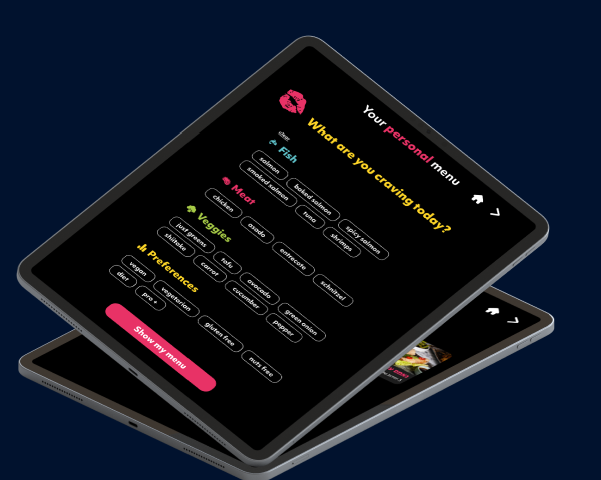
Landwer Cafe is one of the cafes Uppsale works with, and its menu runs on our smart tablet menu. Guests sit down, pick up a tablet at the table, and browse the full menu at their own pace. No printed pages, and no QR code to scan with a phone.
This page walks through how that works day to day. It is written for US cafe owners who are comparing menu options and want to see what a tablet menu looks like in a busy cafe. You can see the cafe itself at landwercafe.com.
How guests browse the menu at the table
A cafe menu has a lot to cover: breakfast plates, salads, sandwiches, coffee, desserts. On paper that turns into a crowded page or a booklet nobody reads to the end. On a tablet, the menu is organized into categories a guest can tap through.
- Guests browse at their own speed, without waiting for a server to come back.
- Each dish can carry a photo, so guests see what they are ordering.
- The same menu can be shown in more than one language, which helps in cafes with a mixed crowd.
- Suggestions and upsells appear in the flow of browsing, so a guest sees the pairing with a coffee or a side without being pushed.
We deliver the tablets ready to use, with charging stations and protective covers. The cafe plugs in and starts.
Showing dietary values without reprinting anything
Dietary information is where a printed menu struggles most. A small symbol next to a dish, a footnote at the bottom of a page, a server who has to remember what is in each recipe. Every change means a new print run.
On a smart tablet menu, dietary values are part of each dish, so they are easy to display and easy to manage. Our AI menu assistant, Sue Chef, scans the whole menu and sorts each item into tags such as gluten free, vegan, high protein, or under 1,000 calories. Guests can then filter the menu by what fits their needs and find suitable dishes in a few taps.
For the cafe, the benefit is on the management side:
- Dietary tags live in one place, so there is no hunting through separate files and printed copies.
- When a recipe changes, the tag is updated once and every tablet shows the current version.
- The data on what guests filter for gives owners a clearer picture of what their customers want.
This does not replace a cafe's own responsibility to know its ingredients. If you want the legal side, our guide to allergen and dietary labeling for US restaurant menus covers what owners need to know.
How staff keep prices and availability current
A cafe menu changes more often than most owners expect. An item sells out by noon, a seasonal special starts, a supplier price goes up. With a printed menu, each of those is either a handwritten fix or a reprint.
With the Uppsale tablet menu, staff update dishes, pricing, and availability from a mobile device, from anywhere, with no technical team needed. When an item runs out, it can be marked unavailable so guests stop seeing it as an option. When a price changes, it changes on every tablet at once.
That means fewer awkward moments at the table, where a guest orders something the kitchen no longer has, and less time spent on menu admin by whoever runs the shift.
What this means if you are choosing a menu for your cafe
If you run a cafe in the USA and are weighing options, the Landwer Cafe setup shows the main points to check:
- Physical hardware. A tablet at the table, rather than a link guests open on their own phones. We cover the trade-offs in tablet menu vs. QR code menu.
- Dietary data you can manage. Tags that guests can filter by and that you can update in one place.
- Control from your phone. Prices and availability that staff can change without a designer or a reprint.
- A design that fits your brand. We customize the menu to match your concept, and offer professional photography and translation.
For a broader look at how the system works, read our overview of digital menus for restaurants and cafes in the USA, or see how a digital menu can increase restaurant sales.
Want to see it in your own cafe? Get in touch through uppsalemenu.com for a personal walkthrough and a demo menu.
Frequently asked questions
Does the Landwer Cafe digital menu use a QR code?
No. Uppsale does not use QR codes. The menu runs on a smart tablet at the table, so guests browse without scanning anything on their own phones.
How are dietary values shown on the tablet menu?
Each dish carries dietary tags such as gluten free, vegan, or high protein, and guests can filter the menu by what fits their needs. Our AI assistant, Sue Chef, sorts the menu items into these tags.
How do staff update prices and availability?
Staff update dishes, pricing, and availability from a mobile device, from anywhere, with no technical team needed. The change shows on the tablets without reprinting anything.
What hardware does a cafe get?
Uppsale provides the tablets, charging stations, and protective covers. The cafe plugs in and starts.
Can the menu be shown in more than one language?
Yes. Uppsale offers multilingual translation and professional photography so dishes are presented well for all guests.
Is this setup suitable for cafes in the USA?
Yes. Uppsale serves restaurants and cafes in the USA, and the Landwer Cafe setup shows how a busy cafe uses the tablet menu day to day.