
The Short Answer
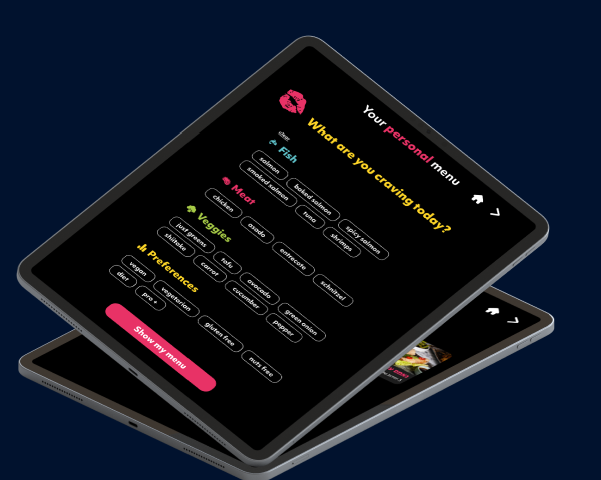
A QR code menu hands the job of showing your menu to the guest's own phone. A tablet menu keeps that job with you: the device sits on the table, loaded with your photos, your design and your current dishes. Both are digital. They create a very different dining room experience.
Uppsale builds the tablet kind only. We do not do QR-code-only menus, so we have a clear opinion here, and we will tell you where a QR code is still enough and where a tablet does more for you.
Guest Experience at the Table
With a QR code, the guest has to take out a phone, open the camera, tap a link and wait for a page to load. If the signal is weak, the battery is low, or the phone is in a pocket for good reason, the first thing your guest does is struggle with your restaurant instead of enjoying it.
A tablet menu removes those steps. It is already on the table, already open, and the guest simply picks it up. Because you supply the device, every guest sees the same screen at the same quality, whatever phone they own.
Photos matter here too. A tablet lets you show dishes with eye catching images and suggest add-ons next to what the guest is already looking at, so the menu works as part of the meal and not just a list of names.
Ease for Older Customers
Many older guests do not like scanning codes, or do not bring a phone to dinner at all. Asking them to install something or fiddle with a camera can feel like a test. A QR code can quietly exclude exactly the regulars who value a calm, easy evening.
A tablet on the table asks nothing of the guest. There is no app, no scanning and no personal device involved. They touch the screen and browse. If you serve a mixed crowd, that simplicity is the biggest practical difference between the two options.
Control Over Presentation
A QR code usually opens a web page or a PDF, and how it looks depends on the guest's screen size, browser and connection. You lose control of the first impression.
With an Uppsale tablet menu, the design is custom to your brand and concept, and it looks consistent in every language and location. You also get real time control: update dishes, pricing and availability from your own phone, with no technical team. Sell out of a dish and you can take it off the menu right away so guests stop ordering it.
We also supply the hardware, including tablets, charging stations and protective covers, so you are not asking guests to bring the equipment.
Dietary Values and Filtering
This is where a smart tablet menu pulls clearly ahead. Dietary information on a static QR menu is usually a few letters next to a dish, and any change means editing a document by hand.
Uppsale's tablet menu makes dietary values easy to display and easy to manage. Our AI menu assistant, Sue Chef, scans your menu and sorts each item into tags such as gluten free, vegan, high protein, under 1,000 calories and vitamin B12 rich. Guests can then filter the menu to find meals that fit their needs in a few taps, and you update the information in one place when a recipe changes.
For the rules behind this, see our guide to allergen and dietary labeling rules for US restaurant menus.
Which Fits Your Dining Room?
A QR code can be enough if you run a very casual counter-service spot where guests are used to ordering on their phones and the menu rarely changes. If your guests sit down, take their time and care about how the experience feels, a tablet is the better fit.
Choose the tablet menu when:
- You serve older or mixed-age guests who should not need a phone.
- You want your design, photos and upsells to look the same for everyone.
- You change prices or availability often and want to do it from your phone.
- Many of your guests ask about dietary needs and you want filtering to answer for you.
To see how this works day to day, read how Uppsale's smart tablet menu works for restaurants and cafes in the USA, or visit Uppsale to ask for a personal walkthrough and a demo.
Frequently Asked Questions
What is the main difference between a tablet menu and a QR code menu?
A QR code menu relies on the guest's own phone to open your menu. A tablet menu is a device you place on the table that already shows your menu, so guests do not need their own phone.
Is a tablet menu easier for older customers?
Yes. Guests touch the screen and browse without scanning a code, installing anything or using a personal device.
Does Uppsale offer QR code menus?
No. Uppsale offers a smart menu on tablets only, not QR-code-only menus.
How does a tablet menu handle dietary needs?
Uppsale's tablet menu displays dietary values and lets guests filter by tags such as gluten free, vegan, high protein and under 1,000 calories. Sue Chef, the AI menu assistant, sorts each dish into these tags.
Can I update a tablet menu myself?
Yes. You can update dishes, pricing and availability from your smartphone, with no technical team needed.
What equipment comes with an Uppsale tablet menu?
Uppsale provides tablets, charging stations and protective covers, so you can plug in and start.