
Are menu templates enough for your restaurant?
If you are searching for menu templates, you probably have a practical problem: the menu needs to look decent, and you do not want to spend a week on it. A menu template is a fair answer to that problem. It gives you a layout, some fonts and a place to drop your dishes in.
The question is what happens after the first print. A template gets you a file. It does not get you a menu that stays accurate when a price changes or a dish runs out. This page compares a printed menu built from a template with a custom tablet menu, and sticks to what Uppsale actually provides.
Time spent editing files
With a template, every change is a file edit. Swap a dish, fix a price, add a seasonal special, then export, check the layout, and send it to the printer. If you run more than one location or offer more than one language, you repeat that work for each version.
With an Uppsale smart menu, you update dishes, pricing and availability from your phone, anytime, with no technical team needed. There is no file to reopen and no layout to fix. A dish that sells out can be marked unavailable in the same moment you notice it.
Reprint costs and wasted stock
Printed menus go out of date the moment something changes. A price correction or a removed item means either a reprint or a pen and a sticker on the old copies. Stacks of outdated menus end up in a drawer.
A tablet menu removes that cycle. The change is made once and shows up on the tablets. Uppsale supplies the full setup, including tablets, charging stations and protective covers, so the menu is something you plug in and run rather than something you keep reordering. It is a different cost shape, not a free one: you are paying for a system instead of paying repeatedly for paper.
Consistency across locations and languages
A template is only consistent while everyone uses the latest version of the file. With several locations, it is easy for one branch to print from an older copy and quietly show different prices or dishes.
Uppsale delivers consistent, high quality design across every language and location, so the menu stays on brand wherever a guest sits. Translation is part of what we provide too, along with professional photography of your dishes, which a blank template cannot supply on its own. For hotel dining rooms with international guests, see our piece on multilingual tablet menus for hotel restaurants.
What a custom tablet menu design offers instead
A template asks you to fit your restaurant into its layout. A custom tablet menu is designed to match your brand, concept and the experience you want guests to have. It is a tablet at the table, not a QR code. If you are weighing the two formats, we compare them in tablet menu vs. QR code menu.
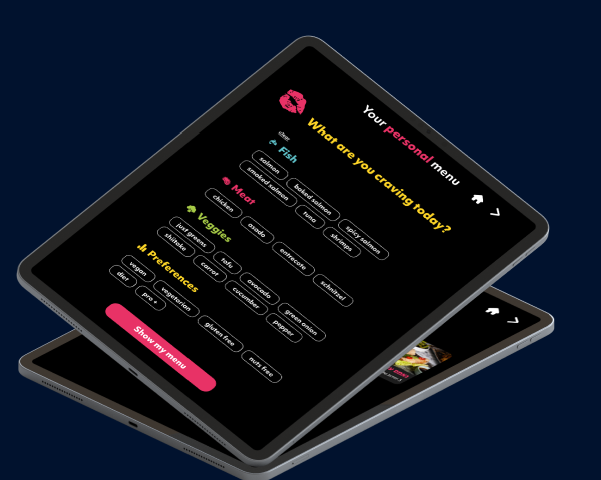
The biggest difference is how dietary information is handled. On a printed template, allergens and dietary notes are small text or symbols you maintain by hand. On the smart tablet menu, dietary values are easy to display and manage. Our AI assistant, Sue Chef, scans your whole menu and sorts each item into tags such as gluten free, vegan, high protein or under 1,000 calories. Guests filter to what fits them in a few taps, and you get data on what guests are looking for. For the regulatory side, read our guide to allergen and dietary labeling for US menus.
Uppsale reports an 8% increase in sales and a 10% reduction in staff dependency across its deployments, with more than 6,000 tablets in use. Those figures come from our own client results, so treat them as a reference point, not a promise for your restaurant. You can see how it plays out in practice in our Ruben USA and Landwer Cafe case pages.
So which is worth the effort?
A template is enough if you run one small location, your menu rarely changes, and you are comfortable reprinting. It is cheap to start and easy to understand.
It stops being enough when your prices or availability change often, when you have several locations or languages, or when dietary information matters to your guests. In those cases the editing time and reprints add up, and a custom tablet menu that you control from your phone is the better use of your effort. If you want to see one working, you can request a demo from Uppsale.
Menu templates and tablet menus: common questions
Are menu templates enough for a restaurant?
A template can work for a single small location with a menu that rarely changes. It becomes harder to manage when prices, availability, languages or locations multiply, because every change means editing and reprinting a file.
Is Uppsale a QR code menu?
No. Uppsale uses a smart menu on a tablet at the table, not a QR code.
How do I update a menu on an Uppsale tablet?
You update dishes, pricing and availability from your smartphone, anytime, without needing a technical team.
How does a tablet menu handle dietary information?
The smart tablet menu makes dietary values easy to display and manage. Sue Chef, Uppsale's AI assistant, tags each dish with labels like gluten free, vegan or high protein, so guests can filter in a few taps.
What equipment comes with an Uppsale menu?
Uppsale provides the full setup: tablets, charging stations and protective covers, so you can plug in and start.
Does Uppsale help with photos and translations?
Yes. Uppsale provides professional photography of your dishes and multilingual translation, with consistent design across every language and location.